
Description
 Logo xili-language
xili-language plugin provides an automatic selection of language in theme according to the language of one post. xili-language use on the fly the .mo files present in the theme’s folder.
- xili-language plugin provides an automatic selection of language in theme according to the language of displayed post, series of posts, page or articles. If the post is in gaelic, the texts of the theme will be in gaelic if the author checks the post as gaelic and if the theme contains the right .mo file for this target language.
- xili-language select on the fly the multilingual .mo files present in the theme’s folder.
Themes with localization can be easily transformed for realtime multilingual sites. - NEW: With now WordPress 3.0, the default theme named twentyten can be used without php coding for a multilingual site as shown here. xili-language plugin works on mono or multisite mode.
- xili-language is also dedicated for theme’s creator or webmaster with knowledges in CMS and WP and having (or not) tools to create .mo language files. Through API (hook), the plugin add automatic tools (or links or filters) for sidebar or top menus. Categories or Archives lists are translated also.
- xili-language provides also series of functions which can be hooked in the functions.php file of the theme that you create i.e. for a cms like multilingual website.
New !
Documentation : A new table summarizes all the technical features of this powerful plugin for personalized CMS created by webmaster.
2.1.0
when a singular (single or page) is displayed, linked posts of other languages are set in xili-language-list links . Previously, it was possible to offer this behaviour by using hook (filter) provided by the plugin. Now, for newbies, it will be easier to link posts according languages with widget.
for previous users of navigation menus : v2.1.0 is compatible with settings of previous release BUT introduces now a way to choose multiple menu locations – so revisit the settings page to confirm your previous choice or sets to new navigation way including singular links.
News from 1.8.0 to 2.0.0
Installation
READ CAREFULLY ALL THE README AND PREREQUISITES
- Upload the folder containing xili-language.php and language files to the /wp-content/plugins/ directory,
- Verify that your theme is international compatible – translatable terms like _e(‘the term’,’mytheme’) and no text hardcoded – and contains .mo and .po files for each target language – (application poEdit and/or plugin xili-dictionary can be used)
- verify that a domain name is defined in your theme – see note at end list below,
- Activate the plugin through the ‘Plugins’ menu in WordPress,
- Go to the dashboard settings tab – languages – and adapt default values if necessary by adding your languages in the catalog. You can set the order (1,2,3…) of the series. (used in language_attributes() template_tag).
- Modify each post by setting (checking) the language in xili-language box at the right of the post editing window before publishing.
If you are webmaster and want to add lot of personalizations in your theme, visit expert’s corner.
XILI-LANGUAGE VERSION >=1.8.0 is not compatible with WP less than 3.0
SPECIAL NOTE FOR XILI-LANGUAGE VERSION >= 1.5.0 and WP 3.0
Nothing to do in functions.php as in former version of WP and xili-language : only verify that the theme is localizable and functions.php contains a function load_theme_textdomain(); and that the theme’s folder contains .mo files (in root or a language sub-folder) for each languages of your website. « twentyten » default WP theme is compatible with help of a child theme « twentyten-xili » available here in action and downloadable .
Plugin is backward compatible for theme of monosite. But if you upgrade xili-language, it is better to restore your theme with default load_theme_textdomain();. Delete lines concerned by constants THEME_TEXTDOMAIN and languages sub-folder THEME_LANGS_FOLDER.
NOTE FOR THEMES DESIGNER
If your theme is compatible both for newest (>3.0-apha) and older versions, add some conditional lines.
NOTE FOR COMMENT FORM IN WP 3.0
Today with WP3.0, comments form language is based on default language of admin UI and not on theme’s language. xili-language solves this features. So you need to add this terms msgid in the .po of your theme for translation used by xili-language. In latest version, xili-dictionary adds this option to avoid tedious copy and paste !
Browser detection
To change the language of the frontpage according to the language of the visitor’s browser, check the button in right small box in settings.
text direction, since 0.9.9
Examples *for theme’s designer* of functions to keep text **direction** of theme and of current post :
<?php $themelangdir = ((class_exists('xili_language')) ? the_cur_lang_dir() : array ()) ; ?> <div class="inside <?php echo $themelangdir['direction'] ?>"> ... |
example in loop :
<?php while (have_posts()) : the_post(); $langdir = ((class_exists('xili_language')) ? get_cur_post_lang_dir($post->ID) : array()); ?> <div class="story <?php echo $langdir['direction'] ?>" > |
minimal example in css :
.rtl {direction: rtl; text-align:right !important; font-size:130% !important;} .ltr {direction: ltr; text-align:left !important;} |
Caution : multilingual theme with both ltr and rtl texts needs a rigourous structure of the css !
Archives selection
Archives tags is a very complex template tag in his background and not very easy source hookable. So we decided to add few features : by adding query in vars of the function, it will be possible to display a monthly list of archives for a selected language
wp_get_archives('..your.vars..&lang=fr_fr') |
or the current the theme language
wp_get_archives('..your.vars..&lang=') |
The displayed list of links will be translated and link restrited to display only archives of this language.
WordPress 2.8 beta
Today, xili-language is ‘compatible’ with ‘nightly’ of next WP release.
F. A. Q.
What about WPMU and the trilogy ?
xili-language, xili-tidy-tags, xili-dictionary
Since WP 3.0-alpha, if multisite is activated, the trilogy is now compatible and will include progressively some improvements dedicaded especially for WPMU context. Future specific docs will be available for registered webmasters. Contact us.
How to see post or page ID in dashbord ?
Now since 1.6.0, IDs are displayed in sidebox UI of post edit window.
Are the default rules (functions) of xili-language plugin hookable ?
Yes, by theme’s developers. In plugin’s php script, all is documented and the hooks can be added in functions.php file of the theme. Here one example to create a languages list with flag as here in left sidebar.
Where can I see websites using this plugin ?
dev.xiligroup.com (« why xili-language ? »)
and
www.xiliphone.mobi (« a theme for mobile ») also usable with mobile as iPhone.
JacobandEric informs that these two websites are powered by xili-language :
http://terranovasite.com/blog/
http://altitude-blog.com/
For commercial websites, is it possible to buy support ?
Yes, use contact form here.
What is gold functions ?, is it possible to buy them ?
Some gold functions (in xilidev-libraries) are explained here and some belong to pro services for commercial websites. Yes, use contact form here.
Support Forum or contact form ?
Effectively, prefer forum to obtain some support.
Does xiligroup provide free themes ?
No yet, but a lot of well designed themes like fusion or Arclite are very easily adaptable. Only, a child theme of twentyten is shipped here for demo.
Is poEdit mandatory to edit .po and to build .mo file ?
xili-dictionary avoids to use poEdit to update .mo files with contents of terms of your database (categories, …)
Screenshots
1. an example of wp-content/themes folder of a theme with localization files (.mo)
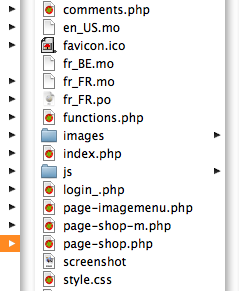 an example of wp-content/themes folder
2. the admin settings UI
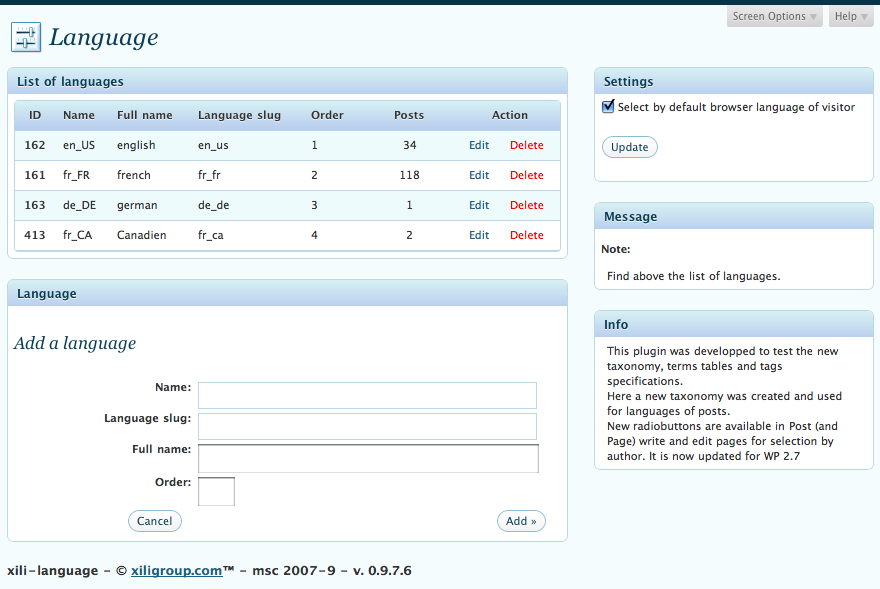 the admin settings UI
3. the language setting in post writting UI
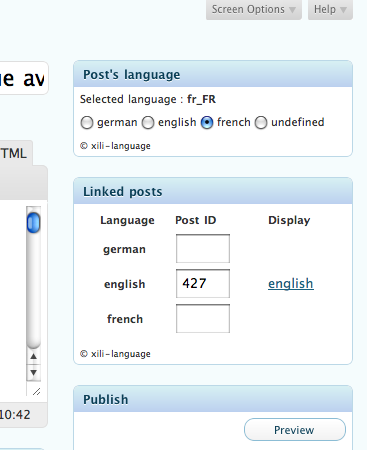 the language setting in post writting UI
4. coding extract with ‘international’ text in ‘xiliphone’ theme
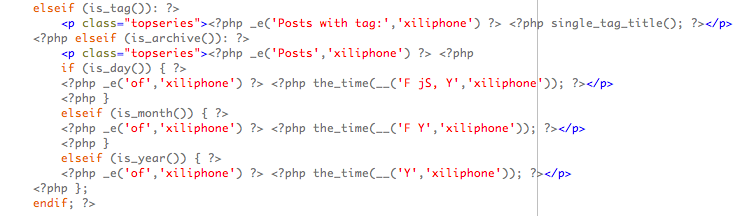 coding extract with 'international' text in 'xiliphone' theme
5. Admin Tools UI – pre-set default language of author according his browser’s language.
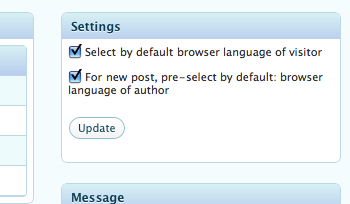 Admin Tools UI - pre-set default language of author according his browser's language.
6. xili-tidy-tags : Admin Tools UI – see this compatible plugin to group tags according languages
 xili-tidy-tags : Admin Tools UI - see this compatible plugin to group tags according languages
7. xili-dictionary : Admin Tools UI – list of translated terms
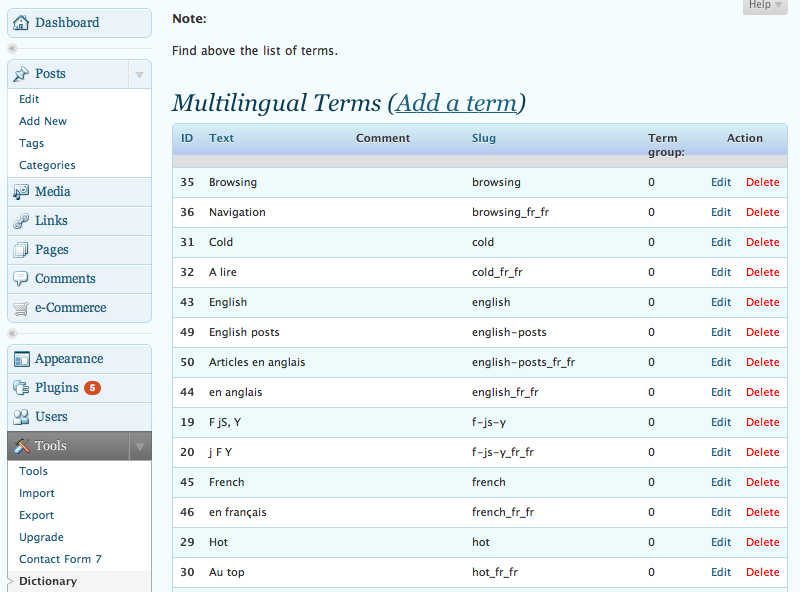 xili-dictionary : Admin Tools UI - list of translated terms
Other Notes
What happens if frontpage is a page ?
Before publishing an ‘how-to‘, since 0.9.9.4, the plugin incorporates now features that are formerly possible through the hookable functions of xili-language. The page frontpage must have her clones in each other languages. As for posts, if the user’s browser is not in the default language, xili-language will display the page in the corresponding language if set by the editor. Be patient, a detailled post will arrive soon…
The first beta releases was for theme’s creator or designer.
See also the other posts about xili-language here.
and the [WordPress plugins forum].
Download
The current version is available in the WordPress Plugins Directory repository.


Ping : xiligroup dev » Extension xili-language : version 0.9.9.4
Can you explain « automatic » selection of language ?
Instead some other multilingual site, with xili-language, all the post in different language are in the SAME wordpress database. No need to do two or more databases. After setting the plug-in, when you create a post, you have only to check the language of the created post. And when a visitor read this post, the theme (with basic rules) will be in the same language as the post language by automatically selecting the .mo file attached to the theme.
M.
Hey guys I have a question for you… i’m trying to install wordpress through wordpress’ admin panel and I’m getting the following error:
‘Parse error: parse error in D:\wamp\www\wordpress\wp-content\plugins\xili-tidy-tags\xili-tidy-tags.php on line 1486’.
Line 1486 is the last line of the file… nothing wrong there.. I looked the whole file and I can’t spot anything wrong with the code… here is what I’m using, PHP: 5.3.0.
Any help appreciated 😉
Hello Giannis !
I am not sure but
Try to erase & in both instantiations at the end
$xili_tidy_tags = new xili_tidy_tags (false, false);
$xili_tidy_tags_cloud_widgets = new xili_tidy_tags_cloud_multiple_widgets ();
Also :
When the error is at the end…. it is often when a control flow (if { or }…. is not correct … is php 5.3 more rigourous !
Thanks for your observations
Hi once again! I tried what you suggested but with no luck ;/
I also rolled back to PHP 5.2.0 and got a « unexpected $end » as you said. the thing is that I scanned again the whole file, I used Aptana and xDebug and I cant find the parse error… I also did this:
I erased the first class ‘xili_tidy_tags’ from the file and I managed to install the plugin correctly, so I suppose that the problem is somewhere in that class.
Has anybody else faced the same kind of trouble?
Thank you
You are the first who describe that pb with PHP 5.2 and 5.3 on his server… Here I test on PHP 5.2.6 (mamp local server) and xiligroup online server (php 5.2.10) and one client use it on PHP4 (it is why the instantiation used =& code)… read you email for other texts…
Hello, how to force on demand lang=en_us to deduce a theme en_us.php? And on demand
? lang=en_rus to use other theme.
Our other plugin xilitheme select is able to select a theme according the browser of the device (here mobile). (https://dev.xiligroup.com/?cat=395&lang=en_us) – It will be note very difficult to do a language theme select but do you think it will be a good idea ?
How many users ask this ?
Michel of dev.xiligroup
This message keeps popping up, and in firefox, it doesn’t even show the website:
no theme domain in index.phpxili-language plugin : THEME_TEXTDOMAIN UNDEFINED
Before I updated the plugin version, this didn’t happen.
Help!!
Thanks for your question. I visit your site and see that your use only page (and not post) to fill your bilingual site… To engage an efficient dialog, I will open a forum discussion here.
Michel
dev.xiligroup team
Hi there
few questions if you can direct me:
1.how do i make the mo.files?
2.what plugin you used in your website to make the tabs in the post?
thanks
1) two ways to build .mo files from .po files : a) on desktop computer, poEdit app is good on all OS (I use it on MacOsX), b) on WP itself, install xili-dictionary plugin which is able to build .po file and .mo file. modified for mootools by Daniel Sturm and us.
2) The Tabs : It is not yet a stand alone plugin – As you can see in js source, the tabs javascript is SimpleTabs from Harald Kirschner
Hope that help you !
M for dev.xiligroup.com
thank you . i will start by testing the xili-dict’ plugin.
Thanks a lot for this pluging, i was using gengo but is out and i couldn’t update my wordpress because wasn’t compatible but with this one… bye bye gengo!! welcome xili-language and WordPress 2.9.2
Hi, I am very new about WordPress. I Installed it at http://www.it.ranabd.com but now totally can’t see. for your kind info before I installed language switcher. I forgot to uninstall it. Now I can’t see my website. please advice me.
This error occurs because your theme is not international or international complient…
The next version (1.4.2a available now) fixes this issues.
It is the opportunity to remind that
1) the theme must prepared BEFORE plugin activation
2) test with theme fusion or arlite from digitalnature – that are ready
I think I find a bug:
DEFAULTSLUG is set by calling $this->get_default_slug() which in turn calls get_terms(‘language’).
However, ‘language’ terms are only registered in set_when_plugin_loaded() which is not called until ‘init’ action is called which is way after DEFAULTSLUG is already set.
The result is DEFAULTSLUG will always be ‘en_US’. This causes all posts that are not selected with a language displayed in English.
Just FYI.
I will do some tests to be sure that I have good understood your observations… I’ll keep you informed.
[update]
The version 1.5.3 fixes the described issue.
Again, recovering the previous behaviour, when the language of the post is not set, the language of the theme is the default language of admin UI set in config.php. (if no special hook and « Select language of the home page » is « software defined »…
Michel
dev.xiligroup.com
Thanks for fixing the bug. One question: is this plugin supposed to also change the default .mo file? The widgets in my side bar don’t seem to be affected by it like the posts.
if your site is bilingual (by example en_US and zh_TW), in your theme folder, you must have two .mo files en_US.mo and zh_TW.mo. To complete these two files (or only the non default zh_TW if theme is coded in english), you must use poEdit software or better xili-dictionary (see doc here and review in WP plugin repository) to add the words of titles of widgets or other terms of your theme. Why ? because files delivered with themes only contain basic terms of the theme design and not the terms of your site (category) or widget.
I guess that you read php, so I think, you will be able to understood translation technics (gettext) with .po (text) and .mo (runtime version)…
Hope that help you
Ping : Confluence: BEHRINGER.COM
great work..
Great Tricks. Thanks for share this. Can you tell me this, how can I create Google Image Search Engine Type in my WordPress Blog Image?
I just updated to 1.8.0 and find that it adds a filter to get_the_post. It seems to map the PHP date symbols to the locale ones. The problem I find is that it doesn’t map timezone symbols (‘T’ or ‘e’) and just leaves them in the final date/time strings.
Just FYI.
Hi!
I used xili_language_list() function to get list of languages. If I switch to other language, ?lang=xx is added to my domain name and everything is translated, but after I open another page, than I see again default page language. What should I do, to be able to switch language only once, not every time I open another blog page?
Thanks!
Just one question – have you choosen a language for each other posts displayed . Each post must be set for a language in top left window of edit dashboard screen… To choose the language of the theme, xili-language must know the language of the post…
If you need, send me via contact your URI
The latest 1.8.6 update is causing this error on my WP 3.0.1 install. Any idea?
[23-Nov-2010 23:02:29] PHP Fatal error: Call to undefined function wp_get_current_user() in /home/jujucom/public_html/wp/wp-includes/capabilities.php on line 1059
It is very very very strange because this function – wp_get_current_user – is a core function present in wp-includes/pluggable.php. Is this file corrupted ?
the backtrace confirms it is caused by a plugin called Theme Test Drive http://www.prelovac.com/vladimir/wordpress-plugins/theme-test-drive – The Author fixes this issues
wow this is one of the worst installation instructions ever.
You really don’t know how to create a tutorial, do you?
Visit this pages : http://multilingual.wpmu.xilione.com/127/xili-language-plugin-creation-of-a-multilingual-website-with-wordpress-3-0-and-his-new-theme-twentyten/
Ping : xili-language : version 1.1.8 is shipped « Forums of xiligroup.dev
Ping : Installing « Forums of xiligroup.dev
Hi!
I’ve just started using xili language on my web site and I think it’s great.
I’m also trying to install some kind of redirection based on visitor’s country ip addresses. For example I would like for serbian ip addresses default language to be serbian and for all other ip addresses the default language would be english.
Is this possible using your plugein? Or could you thing of any other 3rd party plugeins that would serve the purpose?
Thank you!
Today, you can set the displayed language according the language of visitors browser. So, if browser is serbian set, the home page will be serbian and for the other english if you set it as root-default language (as currently in theme.).
No experience about redirection based on IP location…
Hello , Please tell me how to config xili-language in wordpress from admin panel and show it in view. I want my site have page 2 language example : history 1 is english and 1 more is french
Thank for help me
As current plugin, how to are described in readme file inside plugin folder and presented in plugin repository – http://wordpress.org/extend/plugins/xili-language/.
Some other links :
http://wordpress.org/support/topic/plugin-xili-language-xili-language-review
http://multilingual.wpmu.xilione.com/
https://dev.xiligroup.com/?cat=393&lang=en_us
Ping : How to Build Multilingual Sites With WordPress - WPMU.org
Ping : How to Build Multilingual Sites With WordPress | CMS Radar
Ping : How to Build Multilingual Sites With WordPress | Plum